Showing posts with label conversion. Show all posts

Fixing incorrect interpretation of dd/mm/yyyy date in Excel

qubodup 2011-05-18

Assuming the data is sorted by date and considering other cases in the file, the first two lines are wrong.

Here's the snippet I used to fix column D in col E.

=IF(ISNUMBER(D2);DATE(YEAR(D2);DAY(D2);MONTH(D2));DATE(YEAR(D2);MONTH(D2);DAY(D2)))

Add leading zeros to dates in Excel [aka Get rid of/convert dates with no leading zeroes (d/m/yyyy or m/d/yyyy or d/m/yy or m/d/yy)]

qubodup 2010-04-22

I have a date format that has four forms which Excel can't handle.
1/4/2009
9/13/2001
12/12/1642
11/3/2010

I need to convert them to a date. DATE() is fine. How to do it? This way:

=DATE(RIGHT(A2;4);LEFT(A2;FIND("/";A2)-1);MID(A2;FIND("/";A2)+1;IF(LEFT(RIGHT(A2;7);1)="/";1;2)))

Here's the German Excel version:

=DATUM("20"&RECHTS(A2;2);TEIL(A2;FINDEN("/";A2)+1;WENN(LINKS(RECHTS(A2;7);1)="/";1;2));LINKS(A2;FINDEN("/";A2)-1))
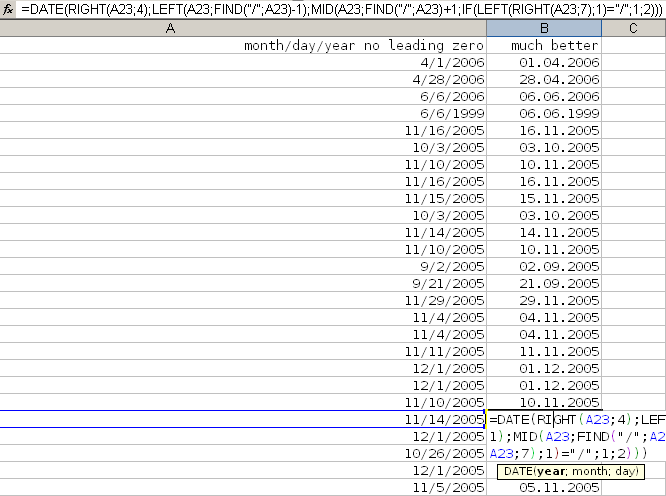

Here's the code for dates in the d.m.yy format:

13.11.07
3.12.07

=DATE("20"&RIGHT(A2;2);MID(A2;FIND(".";A2)+1;IF(LEFT(RIGHT(A2;7);1)=".";1;2));LEFT(A2;FIND(".";A2)-1))

Edit/remove text/strings in/from PDF files/documents

qubodup 2010-04-20

I really need to get rid of "Word" in a pdf file I have. "Word" is just one word with no spaces and it appears on multiple pages in the document.

My solution: Convert the pdf to ps, then remove/replace Word in the plaintext ps file, then convert it back to pdf.

  1. Get/install Ghostscript, Sed and Xpdf.
  2. Create the file removeWordFromPDF.bat

    @echo off
    if [%1]==[] goto help
    goto START
    
    :START
    echo Converting %1
    rem converting pdf to ps
    pdftops %1 %1temp.ps
    echo sed
    rem removing COPY and other strings
    sed -e s/(Word)/()/ ^
     < %1temp.ps > %1tempNoWord.ps
    echo ps2pdf
    rem converting ps to pdf
    ps2pdf %1tempNoWord.ps %1NoWord.pdf
    exit
    
    :HELP
    echo There is no input pdf file for removing a COPY string
  3. Note 1: If "Word" is part of a longer word, you will have to remove one or both of the parentheses in the sed line
  4. Note 2: If there are Unicode letters in "Word", you will need to convert the pdf to ps and open it in a text editor to find out what their code is.
  5. Either add ";C:\Program Files\Ghostscript\gs8.70\lib" (or whatever version, whatever location you have installed to) to "Path" (see below) or replace the pdf2ps/ps2pdf/sed commands in the script with full paths to the executables.

You can now drag&drop pdf files on the .bat file.