Showing posts with label Excel. Show all posts
Add leading zeros to dates in Excel [aka Get rid of/convert dates with no leading zeroes (d/m/yyyy or m/d/yyyy or d/m/yy or m/d/yy)]
qubodup 2010-04-22
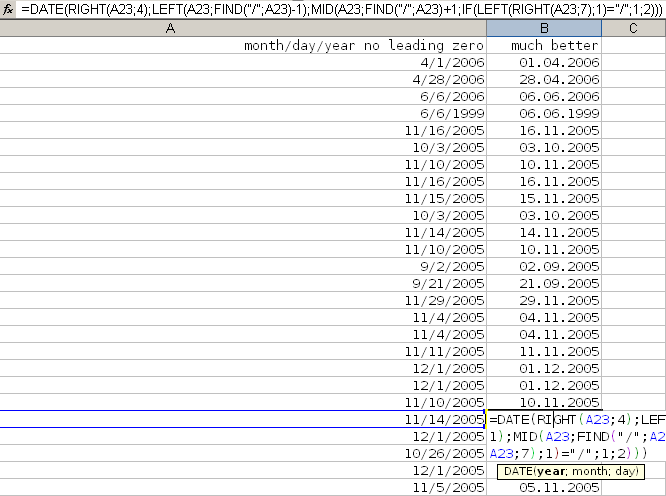
I have a date format that has four forms which Excel can't handle.
I need to convert them to a date. DATE() is fine. How to do it? This way:
Here's the German Excel version:
Here's the code for dates in the d.m.yy format:
1/4/2009 9/13/2001 12/12/1642 11/3/2010
I need to convert them to a date. DATE() is fine. How to do it? This way:
=DATE(RIGHT(A2;4);LEFT(A2;FIND("/";A2)-1);MID(A2;FIND("/";A2)+1;IF(LEFT(RIGHT(A2;7);1)="/";1;2)))Here's the German Excel version:
=DATUM("20"&RECHTS(A2;2);TEIL(A2;FINDEN("/";A2)+1;WENN(LINKS(RECHTS(A2;7);1)="/";1;2));LINKS(A2;FINDEN("/";A2)-1))Here's the code for dates in the d.m.yy format:
13.11.07 3.12.07
=DATE("20"&RIGHT(A2;2);MID(A2;FIND(".";A2)+1;IF(LEFT(RIGHT(A2;7);1)=".";1;2));LEFT(A2;FIND(".";A2)-1))
Compare/show difference between multiple Excel/CSV files/workbooks/sheets
qubodup 2010-01-15
I have screwed up important multi-sheet Excel workbooks and need to compare revisions of them. How do I do it?
I write following .bat (Batch) file. Simply a "compare.txt" file with the ending changed to ".bat" ("compare.bat"). I put it in the folder with all the CSV files. In my case, I have ten revisions and I want to see the difference between two successive/sequenced revisions/versions of each sheet/file.
I know, I know. Anyways, I use my text editor (I use notepad++) to replace "Sheet1" with "Sheet2" etc. (or whatever the sheet names are) since my workbooks are multi-sheet ones.
The output might be overwhelming, so you should increase the CLI buffer size. Click on the CLI window's top left icon, select "Properties" and increase the Screen Buffer Size Height.
I wish I knew how to effectively use the window command prompt/write batch files. Please comment if you know how to enhance the code. Perhaps by looping through all files that only differ in a number but are equal besides that and compare each increment?
- I export the sheets
- I install the command-line tool csvdiff
- I install Open Command Prompt Shell Extension, so I can open a CLI/Command line interface/shell in a folder by right-clicking in it and selecting "Open Command Prompt"
- I start typing a lot:
>"C:\Program Files\csvdiff\bin\csvdiff.exe" -s "," -e "OldFile.csv" -a "NewFile.csv"
I write following .bat (Batch) file. Simply a "compare.txt" file with the ending changed to ".bat" ("compare.bat"). I put it in the folder with all the CSV files. In my case, I have ten revisions and I want to see the difference between two successive/sequenced revisions/versions of each sheet/file.
"C:\Program Files\csvdiff\bin\csvdiff.exe" -s "," -e "File (345).xlsSheet1.csv" -a "File (346).xlsSheet1.csv" "C:\Program Files\csvdiff\bin\csvdiff.exe" -s "," -e "File (346).xlsSheet1.csv" -a "File (347).xlsSheet1.csv" "C:\Program Files\csvdiff\bin\csvdiff.exe" -s "," -e "File (347).xlsSheet1.csv" -a "File (348).xlsSheet1.csv" "C:\Program Files\csvdiff\bin\csvdiff.exe" -s "," -e "File (348).xlsSheet1.csv" -a "File (349).xlsSheet1.csv" "C:\Program Files\csvdiff\bin\csvdiff.exe" -s "," -e "File (349).xlsSheet1.csv" -a "File (350).xlsSheet1.csv" "C:\Program Files\csvdiff\bin\csvdiff.exe" -s "," -e "File (350).xlsSheet1.csv" -a "File (351).xlsSheet1.csv" "C:\Program Files\csvdiff\bin\csvdiff.exe" -s "," -e "File (351).xlsSheet1.csv" -a "File (352).xlsSheet1.csv" "C:\Program Files\csvdiff\bin\csvdiff.exe" -s "," -e "File (352).xlsSheet1.csv" -a "File (353).xlsSheet1.csv" "C:\Program Files\csvdiff\bin\csvdiff.exe" -s "," -e "File (353).xlsSheet1.csv" -a "File (354).xlsSheet1.csv" "C:\Program Files\csvdiff\bin\csvdiff.exe" -s "," -e "File (354).xlsSheet1.csv" -a "File (355).xlsSheet1.csv"
I know, I know. Anyways, I use my text editor (I use notepad++) to replace "Sheet1" with "Sheet2" etc. (or whatever the sheet names are) since my workbooks are multi-sheet ones.
The output might be overwhelming, so you should increase the CLI buffer size. Click on the CLI window's top left icon, select "Properties" and increase the Screen Buffer Size Height.
I wish I knew how to effectively use the window command prompt/write batch files. Please comment if you know how to enhance the code. Perhaps by looping through all files that only differ in a number but are equal besides that and compare each increment?
Export all sheets/pages in multiple Excel files/workbooks as CSV files
qubodup
I have a bunch of Excel files, I need all of their sheets exported. This is how I do it: Open Excel (with no file open), Press Alt+F11, insert code from below, goto Tools/Macro/Macros and run the "Export_Sheets_as_CSV" macro.
I learned on the web how to: close the active file/workbook, do something with every sheet, merge/combine/concatenate/join multiple Excel files (or just do something with many Excel files).
PS: Please, oh please do post improvements to this script if you make any! :)
PPS: Newlines or "\n"s or "LF"s, which you can insert by pressing Alt+Enter in Excel, get exported as well. This causes trouble of course, as a newline indicates a new row in a CSV file. They need to be removed.
I open the affected files in Notepad++ and enable "View/Show all characters" to see them:

The obvious pattern is that unwanted line breaks only have a newline/"\n"/"LF", while wanted also have a carriage return/"\r"/"CR". The solution to my problem is to replace all newlines that have no carriage returns directly before them with nothing. The regular expression to find what I just described is "[^\r]\n". However, it won't work in Notepad++. I don't know why. This wiki page is unfortunately unable to help. My solution is to use the extended search function to first replace "\r\n" with "thisStringIsSafe", then "\n" with "" and then "thisStringIsSafe" with "\r\n".
I learned about newlines and carriage returns here, and was able to construct a regular expression thanks to this overview.
' Global variables
Public FileCounter As Long
Public FileNameArray
Sub Export_Sheets_as_CSV()
'
' Export_CSP_CSV Macro
' Export all Sheets as CSV files
'
GetFileNames
For i = 1 To FileCounter
' Open file i
Workbooks.Open FileName:=FileNameArray(i)
ProcessFile (FileNameArray(i))
' Couldn't figure out how to close by name.. so I'm closing the 'current' workbook
ActiveWorkbook.Close False
'Workbooks(FileNameArray(i)).Close SaveChanges:=False
Next
End Sub
Sub GetFileNames()
' Select files and create array of their names
FileNameArray = Application.GetOpenFilename(, , , , True)
FileCounter = UBound(FileNameArray)
End Sub
Sub ProcessFile(FileName)
' Export every sheet in the file
' Loop through and export sheets
For x = 1 To Sheets.Count
Sheets(x).Select
ActiveWorkbook.SaveAs FileName:=FileName & Sheets(x).Name & ".csv", FileFormat:=xlCSV, CreateBackup:=False
Next x
End Sub
I learned on the web how to: close the active file/workbook, do something with every sheet, merge/combine/concatenate/join multiple Excel files (or just do something with many Excel files).
PS: Please, oh please do post improvements to this script if you make any! :)
PPS: Newlines or "\n"s or "LF"s, which you can insert by pressing Alt+Enter in Excel, get exported as well. This causes trouble of course, as a newline indicates a new row in a CSV file. They need to be removed.
I open the affected files in Notepad++ and enable "View/Show all characters" to see them:

The obvious pattern is that unwanted line breaks only have a newline/"\n"/"LF", while wanted also have a carriage return/"\r"/"CR". The solution to my problem is to replace all newlines that have no carriage returns directly before them with nothing. The regular expression to find what I just described is "[^\r]\n". However, it won't work in Notepad++. I don't know why. This wiki page is unfortunately unable to help. My solution is to use the extended search function to first replace "\r\n" with "thisStringIsSafe", then "\n" with "" and then "thisStringIsSafe" with "\r\n".
I learned about newlines and carriage returns here, and was able to construct a regular expression thanks to this overview.

